You must install: dot net core 1.1 (https://www.microsoft.com/net/download/core) node 6.9.3 or newer (https://nodejs.org/en/download/) I sugest you use vscode to edit your code. It's fast and free. https://code.visualstudio.com/ In order to check that your environments are ready, please create one hello world console application using c# and another using js.
Build a service that listen an http port (3000). When the browser call this route (http://localhost:3000), the service must send a "Hello www world". In order to accomplish this task, use node.js and express.
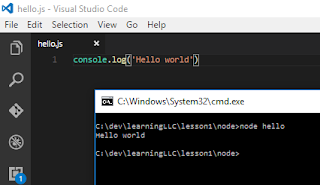
Node After install node 6.10.2 you can check on prompt if everything is all right: C:\dev\learningLLC\lesson1\node>node --version v6.10.2 And you can play for the first time: C:\dev\learningLLC\lesson1\node>node > console.log(1+2) 3 undefined > (To exit, press ^C again or type .exit) > Let's create our Hello World script: Create a new js file. Open it using vscode. Type this complex code: console.log('Hello world') Save. Go to prompt and run it: node [your file]. The extension is optional.

Comentários
Postar um comentário